When organizations think about report governance, they often focus on folders, naming conventions, security, and deciding which reports should be retired. One of the simplest improvements is also one of the most overlooked: create a standard report template and require developers to use it.
A good IBM Cognos or UKG People Analytics report template does much more than make reports look professional. It establishes development standards, improves usability, provides context when reports leave Cognos, and embeds governance directly into the reporting process.
Consistency Matters to the User
Users shouldn’t have to relearn how to read a report every time they open one.
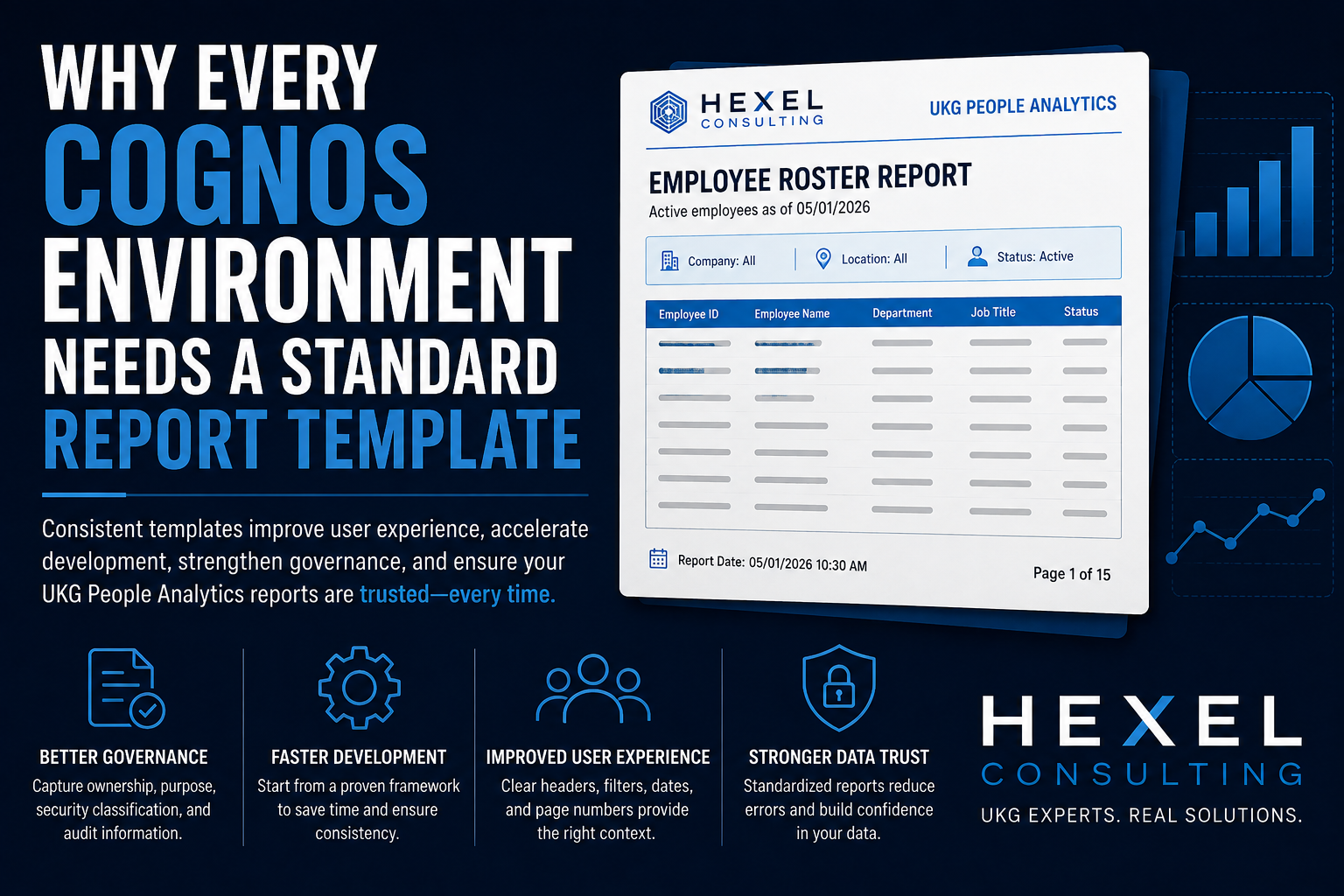
Report titles, company branding, prompts, selected parameter values, report dates, page numbers, headers, and footers should appear consistently. The supplied template, for example, places the report name prominently in the header, identifies UKG People Analytics, provides space to display selected prompt values, and includes both an as-of date and Page X of Y in the footer.
Those details aren’t just cosmetic.
Imagine someone emails you a PDF called Employee Census.pdf. You don’t know when it was generated. You don’t know which company or population was selected. You don’t know whether you’re looking at all 47 pages or only the first 10.
The numbers can be completely accurate and still lead to the wrong conclusion.
A standardized header and footer provide context that stays with the data even after the report has been downloaded, printed, emailed, or separated from Cognos.
Every report should answer basic questions without requiring the user to investigate:
- What report am I looking at?
- What criteria were used?
- When was this information generated?
- Am I looking at the entire report?
- Where did this information come from?
Dates and page counts are particularly valuable. An As of Date helps prevent someone from unknowingly making a decision using an old report, while Page 3 of 17 immediately tells the reader whether the document they received may be incomplete.
Consistency Matters to Developers Too
Templates aren’t only a user-experience standard. They’re a development standard.
Without a template, every Cognos developer starts by rebuilding essentially the same infrastructure: add a logo, create the title, format the header, build prompt displays, create a footer, add page numbering, adjust spacing, and decide how everything should look.
Then the next developer makes all of those decisions again.
That is development time spent solving a problem that was already solved.
A well-designed template gives developers a known starting point. Their job becomes developing the business logic rather than repeatedly designing the report framework.
This also makes reports easier for another developer to inherit. When reports follow a predictable structure, developers know where to look for common components and documentation. Standards reduce the amount of reverse engineering necessary before someone can safely modify another developer’s work.
Show Users What They Selected
One particularly useful feature of the supplied Cognos template is the area directly beneath the report title for displaying prompt selections.
This is an important but frequently overlooked reporting practice.
Suppose an HR leader runs a turnover report for:
Company: ABC Manufacturing
Location: Jacksonville
Period: January–June 2026
If those selections disappear once the report executes, the resulting numbers lose critical context.
A user who receives the exported report later may reasonably assume that the results represent the entire organization.
Whenever practical, important prompt selections should therefore be displayed on the report itself—not just on the prompt page.
The filters are part of the meaning of the data.
Build Governance Into the Template
The user-facing report is only half of the equation.
The supplied template also includes a separate Developer Notes page containing governance information such as Report Owner, Technical Owner, Business Purpose, Security Classification, Last Audited date, and Revision History.
This turns the report itself into part of your governance documentation.
Report Owner
Every report should have an identifiable business owner: the person, team, or functional area accountable for its requirements.
This answers a surprisingly difficult question during a Cognos cleanup:
“Does anybody still need this?”
Without ownership, IT may have no way of knowing whether an apparently unused report supports an annual audit, regulatory requirement, or obscure business process. The governance guidance specifically identifies ownership as the mechanism for determining whether a report is still needed and who should approve significant changes or access.
Technical Owner
Business ownership and technical ownership are different responsibilities.
The technical owner is the person or team responsible for the Cognos implementation: queries, joins, calculations, prompts, filters, bursting, schedules, and maintenance. When something breaks, this tells administrators who understands how the report actually works.
Business Purpose
A report name isn’t documentation.
“Employee Report,” “Employee Listing,” and “Active Employee Report” tell you almost nothing about why those reports exist.
A Business Purpose should explain the process or decision the report supports. This becomes critical when determining whether apparently similar reports are duplicates. Two reports may contain nearly identical information while supporting entirely different business processes.
Security Classification
Not every report should be handled the same way.
The governance standard defines classifications ranging from Public and Internal through Confidential, Restricted, and Highly Restricted. Employee rosters and performance information, for example, warrant different treatment from bank information, Social Security numbers, direct-deposit information, or other highly sensitive PII.
Putting the classification into the development process forces an important question to be answered before the report becomes just another object sitting in Cognos:
How sensitive is the information we’re creating?
That question can influence who receives access and whether scheduling, bursting, exporting, downloading, or distributing the report is appropriate. The governance guidance specifically calls for additional controls around those activities for highly restricted information.
Last Modified Is Not the Same as Last Audited
This distinction deserves special attention.
Cognos can tell us when an object was modified. That doesn’t tell us whether anyone has recently confirmed that the report is still correct.
A report can remain unchanged for years because it works perfectly.
It can also remain unchanged for years because everyone forgot it exists.
A Last Audited date records when someone deliberately evaluated the report and confirmed that it remains accurate, necessary, and appropriately governed. That creates a defensible way to identify reports that should be reviewed, recertified, or retired.
The supplied template goes further by recording not just the audit date, but who performed the audit and their contact information.
Maintain a Revision History
Reports evolve.
A payroll report gets a new calculation. A regulatory requirement changes. Someone modifies employee eligibility logic. A developer adds another business unit.
Six months later someone asks, “Why does the report do this?”
Without documentation, the investigation begins.
The template includes a Revision History designed to capture the modification, date, developer, and contact information.
The description should explain what changed and why, not merely say “Updated report.”
That small amount of discipline can save hours of reverse engineering later.
Don’t Display Developer Documentation to Normal Users
Governance metadata is valuable, but users don’t necessarily need to see several pages of technical documentation every time they run a report.
The supplied template handles this elegantly: the Developer Notes page is conditionally rendered rather than automatically appearing with the normal report output.
That’s a good design principle.
Keep user-facing information visible and developer-facing information accessible.
The report date, title, selected prompts, and page numbers belong on the output because they help users interpret the information.
Ownership, revision history, audit records, and detailed security documentation belong with the report but don’t necessarily belong in every PDF handed to an executive.
Report Template Best Practices
A strong Cognos template should establish a few non-negotiable standards:
Use a consistent header. Include organizational branding and dynamically display the report name rather than requiring developers to maintain another hard-coded title.
Display meaningful prompt selections. If a parameter materially changes the meaning of the results, consider showing the selected value on the report.
Always include a report date. Users need to know whether the information they’re looking at is current.
Use Page X of Y. A page number tells someone where they are. A page count tells them whether they have the entire report.
Standardize the no-data experience. The supplied template explicitly displays “No Data Available” rather than leaving users staring at an unexplained blank report.
Separate business and technical ownership. The person who determines what a report should mean is not necessarily the person who knows how its Cognos queries work.
Document the business purpose. If nobody can explain why a report exists, that is itself valuable governance information.
Classify sensitive information. Data security should be considered during development, not after someone emails a payroll extract to the wrong distribution list.
Record audits separately from modifications. “Someone changed it” and “someone verified it” are fundamentally different things.
Maintain revision history. Future developers should not have to become digital archaeologists just to understand why a calculation exists.
Templates Reduce the Cost of Reporting
There is a tendency to think of report templates as branding exercises.
They’re not.
A good template reduces development time because common components are built once. It reduces maintenance time because reports follow predictable standards. It reduces user confusion because reports behave consistently. It improves security by making classification part of development. And it improves governance because ownership, purpose, auditing, and revision history travel with the report.
Most importantly, it helps preserve the context of the data.
A number without its date, population, filters, source, or completeness can be technically accurate and operationally misleading.
The purpose of a reporting environment isn’t simply to produce numbers.
It’s to produce information people can understand, trust, and safely use.
A standardized Cognos report template is one of the simplest ways to make that happen.